After a deploy, your site can be “up” and still be wrong: a pricing label changes, shipping and returns terms disappear on mobile, or a key CTA gets rewritten by a template. Keyword monitoring in rendered HTML checks whether critical phrases still exist on the page users actually see, helping you catch post-deployment content regressions and trigger page-change alerts before they turn into lost trust or lost conversions.
Keyword Monitoring in HTML to Catch Content Regressions After Deploys
IT
Iliya Timohin
2026-02-11
What is keyword monitoring on a website in HTML
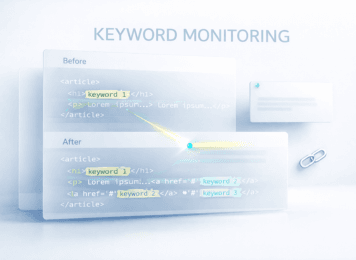
Keyword monitoring in HTML is a content correctness check: it confirms that the phrases you rely on for intent, trust, and conversions are still present in the rendered page after releases, template updates, localization changes, or script injections — in practice, html monitoring for your most critical messaging.Monitor keyword presence in HTML not keyword rankings.
MySiteBoost does not track keyword rankings in Google. It monitors keyword presence in rendered HTML so teams can validate “is this critical phrase still on the page?” right after a release.
Website content monitoring catches silent SEO regressions
Most regressions are subtle: templates shift copy, locales swap strings, scripts rewrite text. Glossary: performance terms.
Keyword monitoring vs rank tracking and Search Console delays
These approaches answer different questions. One tells you what changed in search visibility over time, another confirms what users can read on the page right now after a deploy — which is exactly where content regressions hide.
Rank tracking shows SERP position not on page content
SERP tools show position trends; rendered HTML keyword checks confirm whether the page still contains the phrases that communicate intent, pricing clarity, shipping terms, and trust messaging.
Search Console data lags behind real site changes
Search Console reflects crawling and processing delays (and can correlate with Core Web Vitals), so website change monitoring needs faster feedback for post-deploy validation. Tune cadence with monitoring frequency.
| Monitoring type | What it detects | What it misses | Best use case | MySiteBoost feature |
|---|---|---|---|---|
| HTML keyword monitoring | Phrases in rendered HTML | SERP position shifts | Post-deploy validation | Yes (rendered HTML checks) |
| Rank tracking | Search positions | On-page copy regressions | SEO trend tracking | No |
| Website monitoring | Downtime incidents | “Site is up but wrong” content issues | Availability coverage | Yes (pairs with content checks) |
| Ping monitoring | Network reachability | Content correctness | Basic uptime signal | Optional |
| Port monitoring | Service availability | Copy/UI correctness | API/service health | Optional |
| SSL monitoring | Certificate validity | Copy/UI correctness | Trust + browser security | Optional |
How to monitor site for changes after deployment
Post-deploy monitoring is about verifying content correctness on the pages that carry revenue and trust. The goal is simple: detect website changes that matter before customers, support, or analytics tell you something is off.
Post deployment monitoring best practices for money pages
Start with pricing, checkout, shipping/returns, lead forms, and top landing pages. Define a short set of “must-stay” phrases that signal the page is still doing its job (plan names, pricing labels, shipping terms, trust and compliance lines), then re-check them after template/component updates, localization changes, or script injections. During traffic spikes, pair this with high-traffic prep.
Detect website changes after deployment before users do
Rendered HTML keyword checks complement field metrics: metrics can hint that experience shifted, while keyword monitoring pinpoints what regressed in the page content and where to look first.
Website content monitoring signals worth alerting on
Not every edit should trigger a notification. The best alerts are tied to phrases that represent intent, trust, and conversion-critical clarity — especially on money pages after deployments.
| Regression type | Where it happens | Business risk | Keyword signal | Add-on checks |
|---|---|---|---|---|
| CTA, pricing, shipping terms missing | Templates, components | Conversion drop | Phrase disappears | Uptime monitoring |
| Form copy or validation text missing | Forms, JS | Lead loss | Error/help text disappears | Port checks / synthetic tests |
| Partner backlink removed or altered | Shared blocks, CMS modules | Referral + partner impact | Anchor text disappears/changes | Scheduled checks |
| Wrong language block on the right URL | Localization layer | Trust + UX damage | Language-specific phrase mismatch | Locale validation |
| Script or experiment overwrites critical copy | Tags, A/B tests | Compliance + revenue risk | Sentence changes unexpectedly | Alert routing by owner |
Examples below are typical scenarios teams face after deployments.
Missing keywords in HTML on CTAs pricing shipping and forms
- CTA text disappeared after a layout update. The page still loads, but the action becomes vague or loses intent (“Book a demo” turns into “Learn more”), which quietly hurts conversions.
- Shipping/returns block hidden on a mobile breakpoint. Desktop looks fine, but mobile users can’t find the terms that remove purchase anxiety, so drop-offs rise for “no obvious reason.”
- Checkout form validation messages removed. The form still submits sometimes, but users get no guidance on errors, so abandonment creeps up.
Backlink monitoring in HTML for partner pages and affiliates
Partner backlink removed during a content refresh. A shared footer/module update wipes or alters an anchor, impacting referrals and partner agreements.
Wrong language version and localization content regressions
- Price format changed due to localization settings. Currency symbols, separators, or tax wording shift, and users start questioning whether the price is final.
- Wrong language content rendered for a locale. The URL and hreflang may be correct, but a block falls back to a default language, which damages trust.
Script injections and A B tests overwriting critical copy
- A/B test overwrote the headline and trust badges. Experiments can unintentionally replace messaging that was doing the heavy lifting for reassurance.
- Third-party script injected unexpected text. Tag changes can overwrite critical copy or add unwanted snippets; if it touches security/trust messaging, it compounds with certificate issues — see SSL expiry risks.
How MySiteBoost keyword monitoring detects HTML content changes
MySiteBoost focuses on one practical job: confirming that critical phrases are still present in rendered HTML after releases, template updates, localization changes, or script injections. This makes post-deployment monitoring more actionable because you can detect content regressions without waiting for analytics or user complaints.
Choose pages and keywords to monitor for content changes
Start with the pages where wording directly affects intent and trust: pricing, checkout, shipping/returns, lead forms, and top landing pages. Then pick phrases that act like “content integrity markers” — plan names, guarantees, shipping terms, form hints, compliance lines, and partner anchors.
Set rules for missing changed or partial keyword matches
Alerts work best when they focus on meaningful regressions: a critical phrase disappears, changes in a way that shifts meaning, or only partially matches (suggesting a truncated block, fallback string, or script overwrite). The goal is to highlight what matters, not every harmless copy edit.
Combine keyword checks with uptime ping port and SSL
Keyword checks answer “the page is wrong,” while uptime/ping/port/SSL checks answer “the page is reachable and trusted.” As your coverage grows across pages and environments, you can scale monitoring without losing signal quality.
How to get alerts when website content changes without noise
Alerts only work when they are actionable. The point isn’t to track every small edit — it’s to alert when website changes in ways that impact intent, trust, or conversions, so the right people can fix the regression before customers or analytics surface the damage.
Instant notifications to Slack email Telegram and webhooks
The goal isn’t to alert when website changes everywhere — it’s to alert when a critical page regresses, via Slack, email, Telegram, or webhooks. This keeps the feedback loop tight after deployments and prevents “silent failures” from living for days.
Alert routing by severity and ownership for fast response
Route alerts by severity and ownership so they land where action happens. A missing pricing phrase, a shipping terms regression, or a form validation change should not go to the same channel as a low-impact content tweak. Clear routing reduces noise and shortens time-to-fix after releases.
When keyword monitoring ROI beats another SEO audit sprint
Sometimes the fastest ROI isn’t another round of SEO checks. It’s catching the silent regressions that undo your existing SEO and conversion work right after releases. Keyword monitoring in rendered HTML helps you prevent “invisible” losses on money pages while everything still looks online.
High-impact regressions are cheaper to prevent than to diagnose later
A missing shipping term, a rewritten CTA, or a broken localization block can drag down conversions and trust immediately, but may take days to show up in analytics. Post-deploy keyword checks surface the issue at the moment it happens, when the fix is still small and easy to roll back or patch.
High-impact regressions are cheaper to prevent than to diagnose later
When a page regresses, teams often waste time arguing whether it’s SEO, design, content, or code. A keyword-based alert points to the exact phrase and page that changed, so the owner can act quickly instead of running broad audits and guesswork.
FAQ keyword monitoring and webpage change monitoring
These are the questions teams usually ask when they compare keyword monitoring in rendered HTML with more familiar monitoring and SEO tools. The key idea is that this approach verifies content correctness on critical pages, especially right after deployments.
What is keyword monitoring on a website
Keyword monitoring checks whether specific phrases exist in rendered HTML on selected pages. It’s used to catch content regressions after releases when the site is technically “up,” but key messaging disappears or changes. This is especially useful for pricing labels, shipping terms, CTAs, and trust statements.
How does keyword monitoring work in HTML
It validates the presence (or meaningful change) of predefined phrases in the page users actually see, not just in the template source. This matters because templates, localization layers, and scripts can alter content at render time. The outcome is a high-signal “still correct / regressed” check for important pages.
How can I get alerts when website content changes
You set alerts around the phrases that represent correctness on high-value pages. Instead of notifying you about every small edit, the goal is to notify when a critical phrase disappears or changes in a way that shifts meaning. That’s how alerts stay actionable rather than noisy.
Content monitoring vs uptime monitoring explained
Uptime monitoring answers “is the site reachable?” while content checks answer “is the page still correct?” A useful web page change notification is one that points to a missing or altered phrase on a money page, so the team can fix the regression fast even when there’s no outage.
Conclusion treat content regressions like outages
Content regressions deserve the same attention as downtime, because they break intent and trust while everything still looks online — and they often hit the pages that matter most.
Rendered HTML keyword monitoring is the fastest way to confirm “this page still says what it must say” right after a release. It won’t replace uptime checks; it fills the gap uptime can’t see by validating content correctness on money pages.
MySiteBoost is built for this pattern: HTML keyword monitoring plus instant notifications, combined with uptime/ping/port/SSL checks, gives teams a practical monitoring stack to catch silent post-deploy risks early and fix them before customers, partners, or analytics surface the damage.
What is keyword monitoring on a website in HTML
Keyword monitoring vs rank tracking and Search Console delays
How to monitor site for changes after deployment
Website content monitoring signals worth alerting on
How MySiteBoost keyword monitoring detects HTML content changes
How to get alerts when website content changes without noise
When keyword monitoring ROI beats another SEO audit sprint
FAQ keyword monitoring and webpage change monitoring
Conclusion treat content regressions like outages