A website can look healthy in a monitoring dashboard while the pages that support revenue, leads, access, or SEO visibility may already be failing. The homepage may load, the server may return a successful response, and the uptime graph may stay green. Yet users may still be unable to complete checkout, submit a form, view pricing, log in, or access the content that search crawlers rely on to understand the page. That gap is where basic checks can create false confidence: they confirm that a page responded, but not always that the right page still supports its business purpose.
Why Critical Pages Break While Website Monitoring Stays Green
IT
Iliya Timohin
2026-05-22
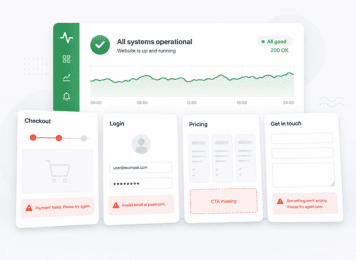
Why uptime checks stay green when critical pages fail
Many uptime checks answer one narrow question: did a monitored URL respond within the expected time? That matters, but it does not confirm that every important page works for users. This is why a stronger website monitoring workflow looks beyond homepage availability and also tracks the pages that support revenue, leads, access, and SEO visibility. A homepage can stay available while an internal page loses a form, a product block, a pricing section, or a login-related service.
For SaaS, eCommerce, and B2B websites, important business outcomes often depend on a small set of critical pages. A green uptime status can confirm availability at a technical level while the actual user path may already be affected.
What 200 OK confirms — and what it does not
A successful HTTP response is not the same as a healthy page. MDN’s definition of HTTP 200 meaning says that 200 OK means the request succeeded. It does not prove that the page contains the expected content, that a CTA is visible, that a form works, or that checkout or login can be completed.
Google’s documentation on HTTP status codes also shows why status alone is not enough for SEO context. A page can return a successful status while still looking empty, incorrect, or error-like to crawlers. In practice, a monitored page can respond successfully while its business value is already reduced.
For example, a page may return 200 OK and still show a generic error message, an incomplete body, a stale cached version, a missing pricing block, or a broken form. The request succeeded. The page experience did not.
Why homepage-only monitoring misses business risk
Homepage-only monitoring is a common blind spot because the homepage is often one of the most stable pages on a site. It may be cached, less dependent on user-specific logic, and easier to keep available than deeper pages.
That does not make it a reliable proxy for the whole website. A homepage can be up while checkout has issues, login fails, a pricing page loses its CTA, or a product page returns incomplete content. Together, these issues create website monitoring blind spots that basic homepage checks may not reveal. For a business, those issues can matter more than the homepage itself because they affect purchases, signups, demo requests, support load, or search visibility.
What counts as a business-critical website page
A business-critical page is any page that directly supports a key business outcome. The exact list depends on the site model, but the logic is consistent: if a page affects revenue, lead generation, account access, trust, support, or SEO visibility, it deserves more focused monitoring than a low-impact informational page.
For eCommerce, this may include product pages, cart, checkout, delivery information, and payment-related steps. For SaaS, it may include login, pricing, signup, onboarding, account access, and dashboard pages. For B2B websites, it may include landing pages, contact forms, demo request pages, and high-value service pages.
Checkout, login, pricing, and product pages
Checkout pages are revenue-critical because they sit where user intent turns into a transaction. Login pages are access-critical because they affect existing users and customer trust. Pricing pages influence qualification and sales conversations. Product pages carry both commercial and SEO value because they connect search visibility, product information, and purchase intent.
These pages can fail partially without a full-site outage. A pricing page may load but lose a CTA. A product page may show stale availability. A login page may open but fail after submission. A checkout page may display but miss a delivery or payment option.
Lead forms, landing pages, and SaaS dashboards
B2B and SaaS websites often rely on forms and landing pages to turn traffic into pipeline. A page may load correctly at first glance, but the form may fail, the demo CTA may disappear after a template update, or a campaign landing page may show outdated content.
Dashboards create a different risk. A dashboard shell may load, but key data may be missing or delayed. From a basic availability perspective, the page responded. From a user perspective, it may not support the task they came to complete.
Common failures that basic website checks miss
Basic checks are useful for detecting full downtime, slow responses, or unreachable endpoints. The problem is that many important failures are not full outages. They are partial, content-level, or page-specific problems.
Missing content, broken CTAs, and empty page bodies
Modern pages often depend on JavaScript, templates, APIs, and CMS-driven content. Google’s guidance on JavaScript SEO explains why rendered content matters: crawlers and users need the final page content, not just a server response.
If scripts fail or routing is misconfigured, the page may return a successful response but still show incomplete or incorrect content. Google’s web.dev example of sneaky 404s shows how routing issues can produce misleading page states. In business pages, similar patterns can appear as missing CTAs, blank sections, incorrect localized content, or product details that never render.
Login, checkout, and form errors without full downtime
Interactive pages often depend on more than the HTML document. They may need authentication, form handling, API responses, payment services, or backend validation. A page can load while the action behind it fails.
In a typical eCommerce scenario, checkout may open but the payment option may not render correctly. In a B2B scenario, a contact form may display but fail after submission. In a SaaS scenario, the login page may appear normal, but the user may not reach the account area. These are examples of why page-level monitoring needs more context than a single status code.
Stale cached pages and partial outages
Caching and CDN behavior can also hide the current state of a page. Cloudflare’s documentation on cache behavior explains how cache rules and request behavior can affect what is served. This means users, crawlers, and monitoring checks may not always see the same version of a page at the same time.
A cached page can look healthy while the origin has a problem. A deployment may update one part of the site while another region still receives older content. A partial issue may affect one page type, API, or service while the homepage remains stable.
How content and keyword checks reduce blind spots
Availability checks answer one question: did the page respond? Content and keyword checks add another layer: did the expected content appear? At that point, critical page monitoring becomes more useful than checking only the homepage.
Keyword monitoring becomes useful for business-critical pages. It can help track whether expected text, CTA wording, product labels, pricing blocks, or specific HTML fragments are present on a monitored page. It does not replace QA, analytics, or deeper workflow testing, but it can reduce the blind spot between a successful response and a useful page.
When keyword monitoring catches silent page failures
Keyword monitoring is useful when a page should always contain a known phrase, label, or element. A pricing page may need a specific plan name. A product page may need availability text. A landing page may need a demo request CTA.
If that expected content disappears, the page may still return 200 OK, but the business signal has changed. A content check can help detect that kind of silent failure earlier than a basic uptime check.
Why expected content matters more than status alone
For critical pages, expected content often carries more business meaning than status alone. A checkout page that returns 200 OK but does not show the expected checkout step is not healthy from a user perspective. A product page without product details is not useful for search or purchase intent. A lead form page without the form is not doing its job.
Content checks cannot prove every backend process works. They cannot confirm every authenticated action, payment edge case, or form submission path. But they can confirm that the page still contains the visible elements users and crawlers need before taking the next step.
Why alerts should follow business impact, not just uptime
Not every alert deserves the same priority. Website alerts become more useful when they reflect the business role of the affected page. An issue on a low-impact informational page should not create the same urgency as a failure on checkout, login, pricing, or a lead-generation form.
Google’s SRE guidance on actionable alerts emphasizes that alerts should be actionable and tied to user-facing symptoms. For website monitoring, this means the best alerting setup is not the one with the most checks, but the one that helps teams notice meaningful problems before they become prolonged business issues.
Which pages need higher alert priority
Higher-priority alerts usually belong to pages that support revenue, lead generation, account access, support, trust, or SEO visibility. For eCommerce, checkout and product pages may need more attention. For SaaS, login, pricing, signup, and dashboard access may matter more. For B2B websites, demo request pages, contact forms, and high-intent landing pages often deserve priority.
The goal is not to monitor every page with the same urgency. The goal is to define which pages the business cannot afford to lose quietly.
How teams can reduce false confidence without alert noise
Better monitoring does not mean more noise. It means checking the right pages with the right signals: availability, HTTP status, response time, SSL checks, expected content, and service-level checks where they matter.
For example, port monitoring can help track whether important services or protocols respond, while content checks can confirm that expected page elements are still present. Together, these signals create a more useful picture than homepage uptime alone.
| Signal checked | What it confirms | What it can miss | Example page | Why it matters |
|---|---|---|---|---|
| HTTP status code | The page or endpoint returned a successful response, such as 200 OK. | Wrong content, empty body, soft error page, missing CTA, broken form. | Pricing page | A successful response does not always mean the page supports conversion or lead generation. |
| Homepage availability | The homepage is reachable from the monitoring location. | Broken checkout, login, product, contact, or dashboard pages. | Homepage | The homepage can stay available while revenue-critical or access-critical pages fail. |
| Response time | The monitored URL responds within an expected time range. | Missing content, broken scripts, incomplete rendering, unusable page state. | Landing page | A fast response is not always a usable page experience. |
| Expected content | A specific text, phrase, CTA, label, or HTML fragment is present. | Backend workflow failure, authenticated action failure, payment gateway issue. | Product page | Expected content checks help catch silent content regressions that status checks may miss. |
| Service or port availability | A specific service, protocol, or port responds. | Page-level content problems, form logic errors, incomplete user actions. | API endpoint or login-related service | Service availability helps detect infrastructure-level issues, but it does not confirm every business flow. |
| Alert priority | The issue affects a monitored page or signal. | Whether the affected page is low-impact or business-critical. | Checkout, login, contact form | Alerts should reflect business impact, not only technical availability. |
Conclusion
Green monitoring does not always mean the business-critical parts of a website are healthy. A page can respond, a homepage can load, and a status code can look successful while users still cannot complete the action that matters.
For teams that need to track availability, expected content, SSL, ports, and alerts across important pages, MySiteBoost helps turn basic website checks into a more practical monitoring workflow.
FAQ
What does uptime monitoring miss?
Uptime monitoring can miss page-level problems such as missing content, broken CTAs, login errors, checkout issues, form failures, stale cached pages, and soft errors.
Can a website return 200 OK and still be broken?
Yes. A 200 OK response means the server returned a successful response, but it does not guarantee that the page contains the right content or supports the intended user action.
What are business-critical pages?
Business-critical pages directly affect revenue, leads, user access, trust, support, or SEO visibility. Common examples include checkout, login, pricing, product pages, landing pages, contact forms, and SaaS dashboards.
Why should checkout, login, and pricing pages be monitored separately?
They can fail while the homepage remains available. Because these pages affect purchases, signups, demo requests, account access, or lead qualification, they need more focused checks than general homepage monitoring.
How does keyword monitoring help detect broken pages?
Keyword monitoring can check whether expected text, HTML content, CTA wording, product information, or other important page elements are present.
Why can homepage monitoring create false confidence?
The homepage can stay online while internal pages, checkout, login, product pages, or lead forms fail. If only the homepage is monitored, teams may miss failures that affect users, revenue, and SEO visibility.
Why uptime checks stay green when critical pages fail
What counts as a business-critical website page
Common failures that basic website checks miss
How content and keyword checks reduce blind spots
Why alerts should follow business impact, not just uptime
Conclusion
FAQ